Alert Triage
Autoheal's Alert Triage agent works on alerts before anything becomes an incident. It groups alerts that share an underlying cause into one prioritized event, investigates each group, and routes the finding to a skill, a deeper investigation, or the right person.
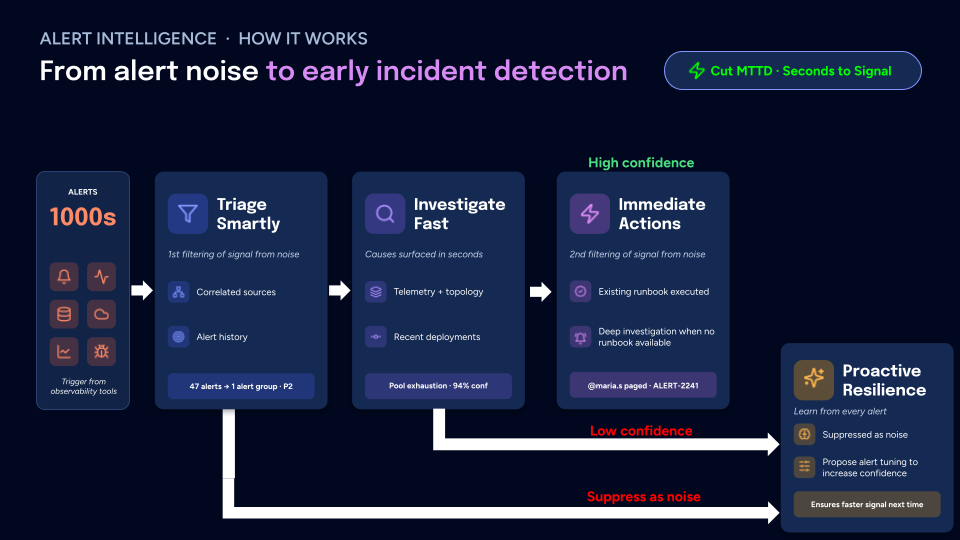
The agent reads alerts from your observability and alerting tools as they fire.
Grouping
The first pass separates signal from noise. Autoheal correlates alerts that stem from the same underlying issue and weighs each against the alert history for that service. Alerts with a shared cause become one grouped, prioritized event, such as "47 alerts to 1 alert group, P2."
Investigation
Alert Triage defaults to a Fast investigation: the agent pursues a single hypothesis for the quickest time-to-signal across high alert volume. For each grouped alert, it gathers context: telemetry and service topology, and the recent deployments that correlate with the alert timing. From that it surfaces a probable cause with a confidence score, such as "Pool exhaustion, 94% confidence."
Next action
The second pass decides what to do with the finding. When an alert skill covers the alert, the agent follows it and proposes the remediation it describes; when none does, it opens a deeper investigation. It can page the right person, for example "@maria.s paged, ALERT-2241." An action that writes to one of your systems, such as a restart or a config change, needs an integration with write tools that the agent has access to, and pauses for a person's approval when a governance policy matches it.
Next Steps
Alert Triage and Incident Response run on the same integrations and share the same setup. See How It Integrates for the tools these agents connect to, and Get Started for the steps to configure them.