SRE Agents
Autoheal's SRE agents work alongside your on-call rotation. They cut through alert noise, drive investigations to root cause in minutes, and coordinate the mitigation.
The page covers two parts of that workflow:
- Incident Response: once an incident is declared, driving it from firefighting to resolution and prevention.
- Alert Triage: before an incident, turning thousands of raw alerts into a handful of events worth acting on.
Incident Response
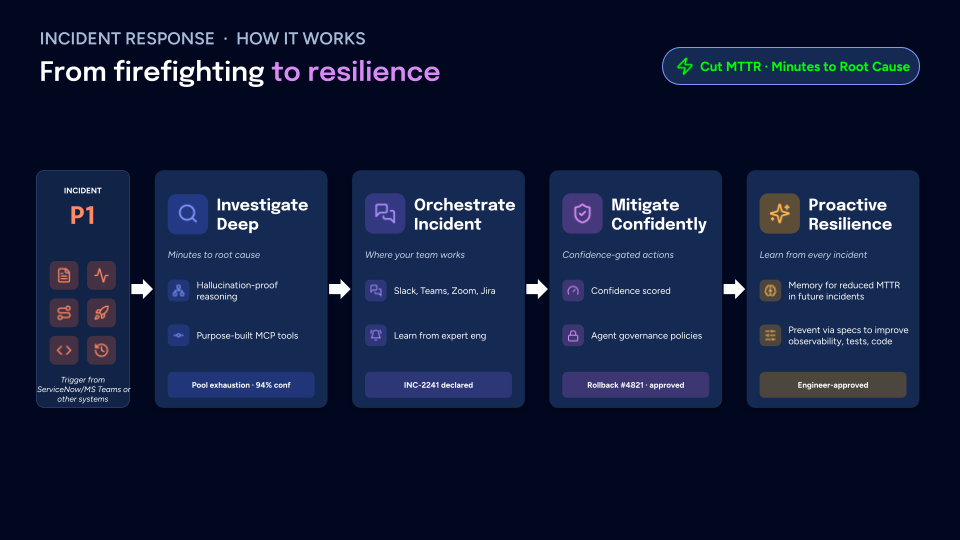
When a P1 is declared, triggered from ServiceNow, Microsoft Teams, or another system, Autoheal takes it from firefighting to resolution. The goal is to cut MTTR to minutes to root cause.
Investigate Deep
Incident Response defaults to a Deep investigation: the agent generates multiple hypotheses and cross-validates them, then returns a ranked root cause with a confidence score, such as "Pool exhaustion, 94% confidence." Every conclusion is grounded in evidence pulled from your systems and recorded, so you can audit how it reached the answer. The agent gathers that evidence through purpose-built MCP tools that query your observability, code, and infrastructure.
Mitigate Confidently
Remediations only proceed once they clear the bar you set. Every proposed action carries an explicit confidence score and is gated by the governance policies you define, so nothing risky runs unattended. Approved high-confidence actions are then executed, such as "Rollback #4821, approved."
Proactive Actions
After an investigation closes, Autoheal looks through the agent trace and surfaces proactive actions: concrete, grounded improvements you can make to detect issues sooner and stop them from recurring. Each action is tied back to the investigations that motivated it, so it comes with evidence rather than being a generic best practice.
Proactive actions are organized into four areas:
| Area | What it surfaces |
|---|---|
| Tune alerts | Noisy, missing, or mis-thresholded alerts revealed by how real incidents actually fired |
| Improve observability | Gaps in metrics, logs, or traces that slowed an investigation down |
| Fix code | Code-level changes that would address a recurring root cause |
| Improve testing | Tests that would have caught a regression before it reached production |
Alert Triage
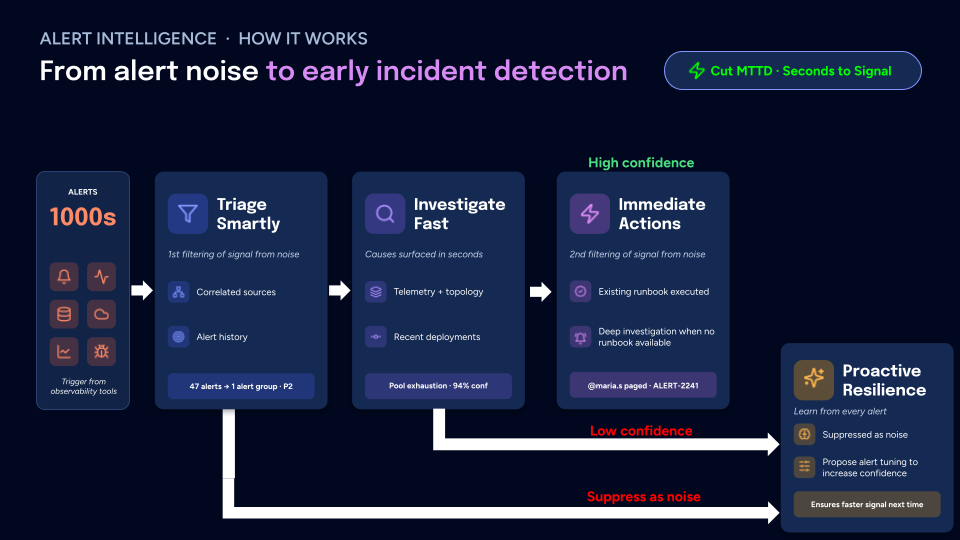
Before anything becomes an incident, Autoheal turns the thousands of alerts streaming from your observability tools into early detection. The goal is to cut MTTD to seconds to signal.
Triage Smartly
The first pass separates signal from noise. Autoheal correlates alerts that stem from the same underlying issue and weighs each against the alert history for that service. Thousands of raw alerts collapse into a handful of grouped, prioritized events, such as "47 alerts to 1 alert group, P2."
Investigate Fast
Alert Triage defaults to a Fast investigation: the agent pursues a single hypothesis for the quickest time-to-signal across high alert volume. For each grouped alert, it gathers context: telemetry and service topology, and the recent deployments that correlate with the alert timing. From that it surfaces a probable cause with a confidence score, such as "Pool exhaustion, 94% confidence."
Immediate Actions
The second pass decides what to do with the finding. When a known remediation applies, the agent runs the existing runbook. When no runbook is available, it opens a deeper investigation. If confidence is high, it acts or pages the right person, for example "@maria.s paged, ALERT-2241."
How It Integrates
SRE agents work with your existing on-call workflow:
| Integration Type | Integration Examples | How Autoheal Uses The Integration |
|---|---|---|
| Alerting / On-Call | PagerDuty | Receives alerts and triggers investigations automatically |
| Observability | Datadog, Grafana | Queries metrics, dashboards, and monitors for evidence |
| Error Tracking | Sentry | Pulls error details, stack traces, and exception patterns |
| Source Control | GitHub, GitLab | Reviews recent deployments, commits, and PR history |
| Collaboration | Slack, Microsoft Teams | Invoked via @Autoheal to coordinate the response in-channel |
| ITSM / Incident | ServiceNow | Receives incident triggers and keeps records in sync |
| Logging | Elasticsearch | Searches logs for error patterns and anomalies |
Get Started
- Connect your monitoring tools (Datadog, Grafana, or similar)
- Set up PagerDuty for automatic alert-triggered investigations
- Add skills to your Engineering Context Graph for your most common alert types
- Connect Slack so your team can interact with investigations in real-time